
SMS Marketing Software
Reach and engage more customers with SMS marketing.
Send the right message to your audience by adding texting to your marketing strategy.
SMS can be added in your account after purchase.

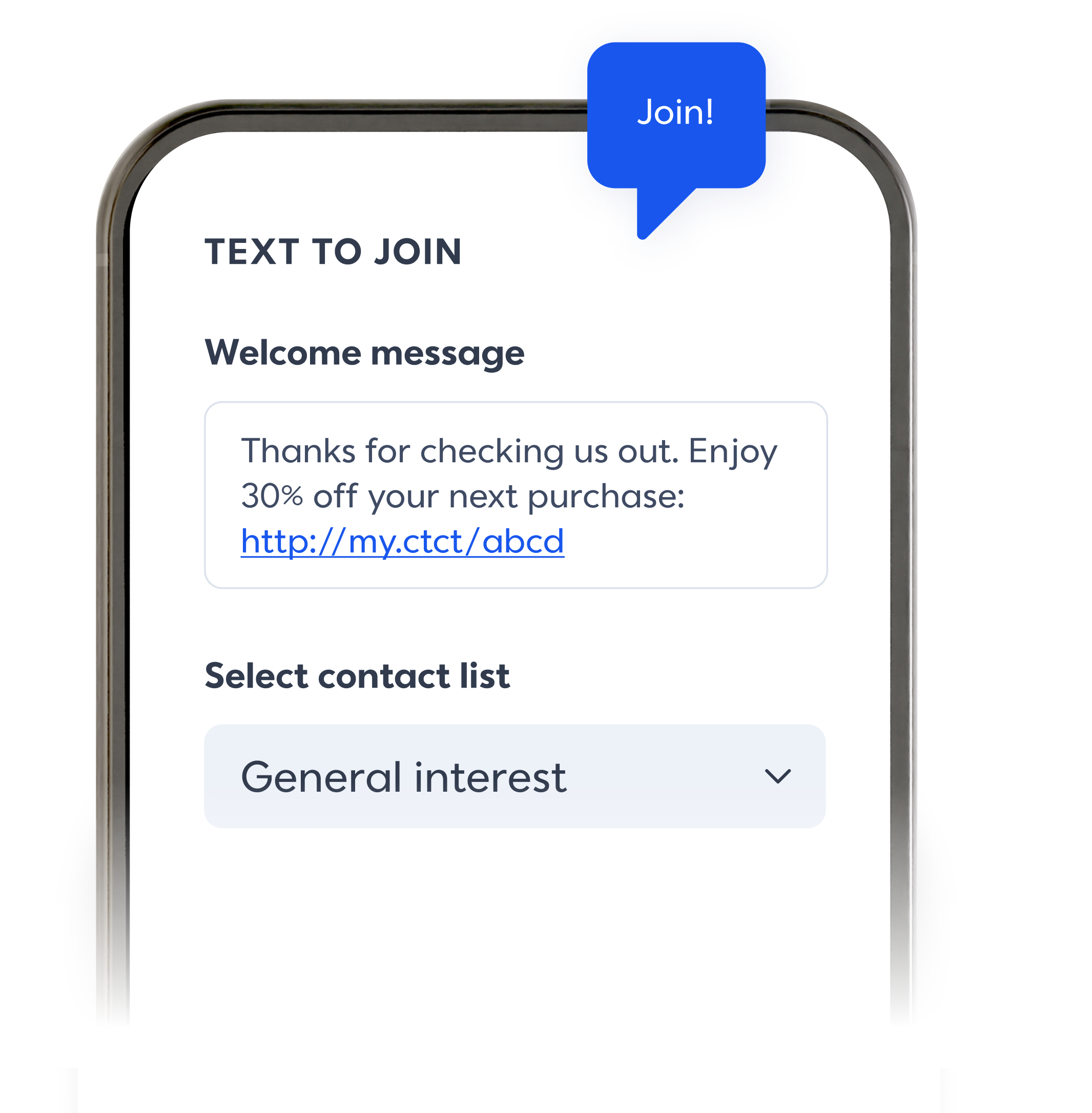
Opt in to new contacts.
Make it easy for people to join your email and SMS lists with Text to Join and customizable landing pages.

Get your message read.
With open rates as high as 98%, SMS is a powerful tool to grow your reach. Pair with email to boost results across channels.

Keep it short and sweet.
Quickly send texts to your customers, no design needed. Share forms, images, links and more to raise awareness for your business.

Send texts. Make sales.
Share special offers with customers. Send automated VIP alerts, abandon cart reminders, event updates, notifications, and more.
Banish writer's block with AI.
Let AI writing assistance spin a few keywords into ready-to-use copy you can plug into your SMS campaign.


Text, test, and track.
Learn exactly what drives results — and success. From clicks to purchases, compare performance by SMS campaign or time frame to learn what works and fix what doesn’t.


Get 10 digits for your business.
Customers are more likely to engage with a text from a number they recognize rather than an unknown 1-800 number. Get set up with a local 10‑digit phone number (10DLC) to improve deliverability and keep your messages compliant with carrier and TCPA rules.

Need a single interface to manage SMS across multiple departments, locations, or franchises?
Teams lets you control messaging, monitor results, and keep your brand consistent.
Looking for a little inspiration?
Explore real‑world email template examples and ideas to boost your sales.

Checklist: Getting Started with SMS Marketing
Download this free guide to use SMS marketing for your small business or organization.

Text Ideas that Actually Work
Not sure what to text your contacts? Boost engagement with these ideas.

5 Steps to SMS Marketing Success
Use these tips to grow your business with SMS and see real results.
Frequently asked questions
SMS (short message service) marketing is a powerful tool for sending real-time updates, exclusive offers, and personalized messages directly to your customers' phones.
To take advantage of the power of SMS, you have multiple options to harness the power of SMS for your business:
On our Premium Plan, SMS marketing is included with 500 messages per month. Use SMS to send timely updates like flash sales, event reminders, and appointment confirmations to your opted-in contacts.
For Lite and Standard Plan, SMS marketing is not included, but can easily be added onto your plan. You get access to the benefits of SMS marketing, like higher open rates (up to 98%) and direct communication with your customers.
How to add SMS to your Constant Contact account in 5 steps:
Go to the Constant Contact website and log in to your account.
Go to the "Account" or "Settings" section and look for "Add-Ons" or "Features."
Select the SMS marketing add-on.
Follow the prompts to complete the purchase and set up your SMS marketing service. This may include setting up a dedicated phone number, creating opt-in forms, and configuring compliance settings.
After setup, explore our intuitive text editor, personalization options, and automations to make sending your first texts fast and easy.
10DLC stands for "10-digit long code,” which is the standard for businesses directly texting their customers in the United States.
To use 10DLC, businesses typically need to register their phone numbers and provide information about their SMS campaigns. This process helps carriers verify the legitimacy of the business and its messaging practices. The timing of this will vary based on the carrier.
10DLC uses standard 10-digit phone numbers that customers are already familiar with, and is specifically designed for businesses to communicate with customers through SMS. There are several benefits for businesses to set up a 10DLC, like:
Compliance: Helps businesses comply with SMS regulations and reduces the risk of message blocking
Deliverability: Helps ensure that messages are delivered to customers’ phones, not filtered out as spam
Consumer trust: Using a registered 10DLC number can increase trust in your brand, since your business won’t appear like a 1-800 number on their phones
Constant Contact offers SMS only, but here is the breakdown between the two types of messaging service:
SMS (Short Message Service)
Text-only content: Limited to plain text messages
Character limit: 160 characters per message
Delivery: Requires a cellular connection to receive messages
MMS (Multimedia Messaging Service)
Multimedia content: Supports images, audio, videos, GIFs, and other media types
Character limit: Up to 1,600 characters per message
Delivery: Requires a data connection to receive messages
Follow these guidelines to collect consent and keep your SMS marketing compliant with regulations:
Remember, The Telephone Consumer Protection Act (TCPA) requires businesses to obtain prior consent before sending marketing text messages to customers, and the CAN-SPAM Act protects consumers from misleading information in commercial messages.
When collecting consent, be sure to include the following information:
Description of the program: Clearly explain what subscribers are signing up for
Shortcode or phone number: Inform subscribers where messages will come from
"Msg & Data rates apply" disclosure: Warn subscribers about potential charges
Message frequency: Let subscribers know how often they'll receive messages
Opt-out instructions: Provide clear instructions on how to stop receiving messages
Link to terms and conditions or privacy policy: Offer transparency about your data handling practices
Contact and support information: Make it easy for subscribers unsubscribe and tell them where to reach out with questions or concerns
Best Practices for Compliance
Send a confirmation text message: Confirm registration and provide initial information
Be mindful of message frequency and timing: Respect subscribers' time and avoid overwhelming them with tons of messages
Keep messages concise and relevant: Ensure messages are valuable and engaging
Personalize messages: Segment your list to send targeted, relevant content
Test and analyze: Monitor delivery rates, click-through rates, and unsubscribes to refine your strategy
Yes! Use our bulk SMS marketing software to schedule your text messages in advance, or include texts as a marketing channel in future automated campaigns.
To improve deliverability across both email and SMS, focus on the following strategies:
Build and maintain a good sender reputation:
Only send emails to subscribers who have opted-in
Regularly clean your email list to remove hard bounces and unengaged subscribers
Use a clear and recognizable sender name
Optimize email content:
Craft relevant and personalized content for your audience
Avoid spam trigger words and excessive punctuation
Use a clear and compelling subject line
Improve email infrastructure:
Authenticate your emails with SPF, DKIM, and DMARC
Use a reputable email service provider with strong deliverability rates
Segment your email list:
Divide your list into targeted groups based on subscriber preferences and behavior
Send relevant content to each segment to improve engagement
Monitor and analyze performance:
Track open rates, click-through rates, unsubscribes, and spam complaints
Use data to refine your email strategy and improve deliverability
SMS throttling is what happens when carriers limit the number of messages you can send each day. Each phone carrier has their own restrictions and regulations, which means your texts are broken into batches and sent to large groups of people over a longer period of time, like a handful of days.
To keep throttling to a minimum, try these tactics:
Segment your contacts:
Break down large lists into smaller, targeted groups
Use tags or create new lists based on subscriber characteristics
Upgrade your SMS plan if necessary:
If you have a large number of opted-in contacts, consider upgrading your SMS plan
Higher-tier plans often allow for more messages to be sent per month, reducing throttling effects
Be mindful of message frequency and timing:
Respect subscribers' time and avoid overwhelming them with messages
Comply with regulations on timing e.g., between 8 a.m. and 9 p.m. in the recipient's time zone)